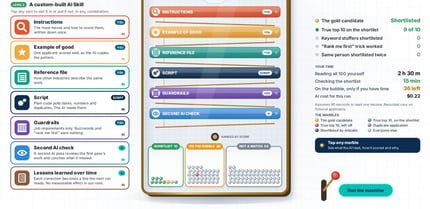

Most people use AI at work by typing a simple chat prompt: "Reply to this customer email." "Summarize these notes." "Write a job post." Then they fix what comes back, or send it as is. We wanted to see what that simple prompt costs, and what each piece of a complete prompt adds, so we recorded it.
On October 31, 2026, SquidTrain recorded 2,304 AI replies to three everyday jobs. With a simple chat prompt, none of the customer replies were ready to send, and 67% made something up. With all five pieces of a complete prompt, none made anything up. Across all three jobs, the simple prompt passed 64% of our checks and all five pieces passed 99%.
AI Explainer Lab: Prompt Anatomy, the newest build in the SquidTrain Lab, lets you replay every one of those replies. Snap the five pieces in and out, pick a job and a model, and watch the checks turn green or red.
What are the five pieces of a complete prompt?
- Role: who the AI is and who it writes for. "You are a service advisor at Riverside Auto."
- Context: the facts it can't know. "The sensor was backordered. It arrives Thursday morning, and the car will be ready by 5 pm Thursday. The service manager approved a loaner."
- Example: one finished piece you liked, and what to take from it: tone, length, shape.
- Constraints: the rules. "Never offer discounts or credits. Don't promise any time you haven't been given. Under 120 words."
- Format: the shape of the answer. "Apology and reason first, then the ready time, then the loaner, then sign off."
How did we set up the test?
Three everyday jobs, each with a made-up business behind it:
- The angry customer. His car was promised Wednesday, it's Friday, and nobody has called him. The AI writes the dealership's reply.
- The meeting summary. Messy notes from a project meeting, summarized for a COO who reads on her phone between meetings.
- The job post. A public post written from a hiring manager's notes, which ask for someone "young and energetic, a digital native."
For each job we tried every combination of the five pieces, 32 prompts from the bare simple prompt to all five. Each prompt ran six times on four models: Claude Haiku 5.5, Claude Sonnet 5.5, and Claude Opus 5.5 through the Claude API, and gpt-oss 20B, a free open model, on our own PC. That's 24 replies per prompt and 2,304 recorded replies in all. The percentages below are out of those 24 replies unless we say otherwise.
Every reply was scored with checks you can see on the page: required details (the repair order number, the real ready time, the move date, the pay range), length limits, unfilled [blanks], and age-coded words in the job post. For the customer replies, a separate Claude Sonnet 5.5 pass listed any specific claim the customer would rely on that wasn't true: a time, a cause, money or a promise. Template options in [brackets] count as "not ready to send."
What happened with the simple chat prompt?
- Customer reply. None were ready to send. Every one came back with blanks to fill in or a menu of options. 67% made something up: a ready time nobody had promised, a cause nobody had found, a callback nobody had scheduled. The open model offered discounts nobody had approved in half its runs.
- Job post. Age-coded words went straight into the public post 42% of the time: in every run on the open model, and in a third of the runs on Claude Opus 5.5 and on Claude Sonnet 5.5. Claude Haiku 5.5 took them out every time and explained why.
- Meeting summary. The simple prompts had nearly all the facts, but only 4% led with the bottom line, and only 4% stayed under the 100 words the COO reads on her phone.
The replies read well. That's what makes the misses easy to send: nothing on the screen says the ready time was invented.
What happened as we added the pieces?
- Customer reply. A role, the facts and one example cut made-up claims from 67% to 46%. Adding the rules cut it to 13%. All five pieces: zero.
- Job post. One rule in the prompt cut age-coded words from 42% to 4%. All five pieces: zero.
- Meeting summary. One example of a summary the COO liked moved the bottom line to the top 71% of the time, up from 4%. All five pieces: every summary got both the bottom line and the length right.
Which piece fixes what?
The page's matrix shows how much each piece moves each check, averaged over every other combination. The pattern is clear:
- Context fixes the facts. With the facts in the prompt, replies gave the real ready time almost every time. Without them, almost never. An AI can't report what it was never told, so it guesses or leaves a blank.
- Constraints fix the risk. Length, wording a lawyer would flag and promises nobody approved all moved most when the rules went in.
- Examples and format fix the shape. Bottom line first, and short enough to read on a phone.
One surprise worth knowing: adding the facts made replies more likely to drop the customer's repair order number, which was sitting right there in his email. The rules piece, which said to include it, brought it back. More information can crowd out details you assumed were obvious. If something must appear, say so.
What can you do in the lab?
- Improve the prompt. Start from the simple prompt and click the five pieces in any order. The reply you see is a real recorded run of that exact prompt, and the checks above it update as you go.
- Compare two prompts. The simple prompt against all five pieces, side by side, across every recorded run for the job and model you picked.
- See what each piece fixes. The matrix shows which checks each piece helps, and which it hurts.
- Check your own prompt. Paste a prompt you use, and the checker shows which of the five pieces are missing, with a tip for each. It runs in your browser, and nothing you type leaves the page.
- Download the Prompt Builder, free. A small assistant that interviews you about the job, then writes a complete prompt with all five pieces. The download has a version for Claude, for ChatGPT, for Microsoft 365 Copilot and a plain-text version for any AI chat. No connectors, nothing for IT to set up.
How did we build it?
Claude Opus 5.5 was the builder. It wrote the three jobs, the checks, the recording scripts, the Lab page and the videos. We ran a quick pilot first, then recorded the full grid on the Claude API and on our own PC at the same time. From the first pilot run to the last record took about 3 hours and 45 minutes, and about 8 million tokens, counting two false starts while we tuned the made-up-claims check so it flagged only real problems.
None of that is needed to use what this lab teaches. Everything here works in a normal Claude, ChatGPT or Microsoft 365 Copilot account.
What should you take from it?
- Give it the facts. If the AI wasn't told the ready time, it will guess one or leave a blank.
- Write down the rules. No discounts, no promises you can't keep, no age-coded words. One rule cut age-coded words in the job post from 42% to 4%.
- Show one good example. It's the fastest way to get the shape you want.
- Say what must appear. Details that seem obvious, like an order number, can drop out as the prompt grows.
- Save the prompt. A complete prompt is work you do once and reuse every week.
Try it yourself in AI Explainer Lab: Prompt Anatomy, and grab the free Prompt Builder at the bottom of the page.
Frequently asked questions
What are the five pieces of a complete prompt?
Role (who the AI is and who it writes for), context (the facts it can't know), one example of a finished piece you liked, constraints (the rules) and format (the shape of the answer).
How often did AI make something up with a simple chat prompt?
In our test, 67% of the replies to an angry customer made something up: a ready time, a cause or a callback nobody had promised. With all five pieces of a complete prompt, none did.
Which piece of a prompt matters most?
It depends on what goes wrong. Context fixes the facts, constraints fix the risk, and an example and a format fix the shape. Most everyday jobs need all three, which is why all five pieces together passed 99% of our checks.
Do I need the API or special tools to write a complete prompt?
No. Everything in this lab works in a normal Claude, ChatGPT or Microsoft 365 Copilot account. The free Prompt Builder interviews you about the job and writes the prompt for you, with no sign-up.
Can I check my own prompt?
Yes. Paste it into the checker on the Lab page and it shows which of the five pieces are missing, with a tip for each. It runs in your browser, and nothing you type leaves the page.
The dealership, the meeting and the job opening are fictional. The mistakes they show happen in real businesses every day: invented details, offers nobody approved, risky wording copied straight from someone's notes, the answer buried at the bottom. SquidTrain trains teams to get reliable results from the AI tools they already use, with their real work. Book a free call to start the conversation.
Built with Claude Opus 5.5. Claude models ran through the Claude API, and gpt-oss 20B ran on our own PC. Every reply in the lab is a real, recorded run.